Quick answer: The Best Spy App for iPhone and Android in 2024 is mSpy!
Are you worried about what the kids are doing online? Or maybe you are a business owner and just want to track how your employees use the company device? Spy apps are your solution.
You can download and install them on Android or iPhone and check the smartphone usage, including social media, text messages, phone calls, specific applications, etc. The app is hidden, and the person will not know that it is installed on the device.
Moreover, most spy apps keep their recorded data in the cloud, meaning that you can check information from anywhere.
However, selecting the best application can be quite difficult, as there are hundreds of products for both platforms. Are they worth your time and money?
We checked and tested a lot of spy apps and here is the list of the best 10 of them.
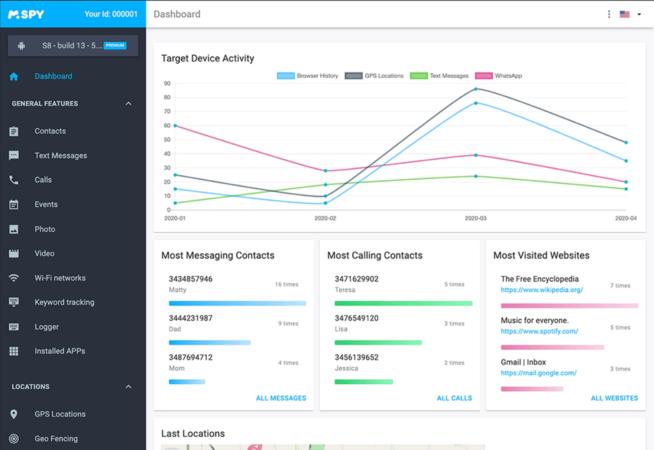
The mSpy app is often considered a good choice for spy software for several reasons, particularly for those interested in parental control or similar monitoring purposes. Here are the key aspects that contribute to its popularity:
Pricing: The tiered pricing structure offers flexibility for different budgets and needs. It becomes more cost-effective with longer commitments.
Compatibility: It supports a wide range of devices, including iOS 7-9.1 with jailbreak and all versions without jailbreak, as well as Android 4 and newer. This broad compatibility makes it accessible to a large user base.
User-Friendly Interface: mSpy is designed to be intuitive and easy to use, which is beneficial for those who are not particularly tech-savvy.
Comprehensive Monitoring Features: The app includes a wide array of monitoring capabilities:
Communication Tracking: It can track text messages, calls, emails, and most messaging apps.
GPS Location Tracking and Geo-fencing: These features allow for real-time location tracking and setting boundaries for the target device.
Internet and Application Control: mSpy enables monitoring and control of app usage and online activity.
Media Access: The ability to view photos and videos stored on the device.
Screen Recording: This feature can record the activity on the device screen.
Access to Contacts and Calendar: Users can view the target device’s contact list and calendar entries.
Detailed Reports: The app provides comprehensive reports on the device’s activity.
Stealth Mode: The app remains hidden with no icon, making it discreet.
No Need for Jailbreak or Rooting: Basic monitoring options are available without the need to jailbreak or root the device, which is a significant advantage for preserving the device’s security and warranty.
Reliable Tech Support: Fast and efficient customer support is available to assist with installation and operation.
Family Pack Options: mSpy offers packages that allow monitoring multiple devices, which is convenient for families or businesses.
Regular Updates: The information from the monitored device is updated every 5 minutes, ensuring timely data.
Despite these advantages, there are also some considerations:
Privacy and Legal Concerns: The use of spy apps raises significant ethical and legal issues. It’s essential to use such software in compliance with local laws and only for legitimate purposes, such as parental control.
Potential Need for Jailbreak or Rooting: For more advanced features, jailbreaking or rooting might be required, which can be complex and risky.
Pricing Transparency: The pricing structure could be clearer, with all costs and renewal fees displayed upfront.
Overall, while mSpy offers a range of features that can be beneficial for monitoring, it’s crucial to consider the legal and ethical implications of using such software. It should only be used in appropriate scenarios and always in compliance with the law.
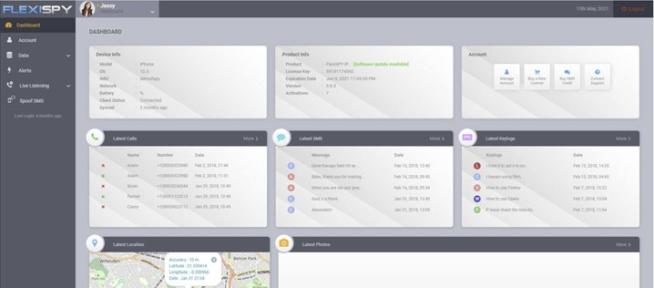
FlexiSPY stands out as a robust spy app for both iPhone and Android devices, offering a comprehensive range of features that cater to various monitoring needs. Below are key aspects that contribute to its effectiveness:
Pricing Structure:
Lite: $29.95 per month.
Premium: $68 per month, $99 for 3 months, $149 for 12 months.
Extreme: $199 for 3 months, $349 for 12 months.
Compatibility:
Compatible with iOS 6.0 and newer, Android 4 and newer.
Unique and Powerful Features:
FlexiSPY is renowned for its unique capabilities, setting it apart from other spy apps. Its powerful functionality makes it particularly suitable for those who require advanced monitoring features and are comfortable with technology.
Unbeatable Capabilities in the Extreme Version:
The Extreme version of FlexiSPY goes beyond standard monitoring features, offering unparalleled spying capabilities, including an app for computers.
Comprehensive Access and Monitoring:
Users gain access to call logs and have the ability to listen to phone calls live.
The app provides access to contact lists, calendars, and multimedia files.
It allows for remote recording, activation, and deactivation of the target device.
Advanced Tracking and Control Features:
FlexiSPY tracks text messages, emails, and messaging app activities.
It offers geolocation tracking, remote restart, and battery level monitoring.
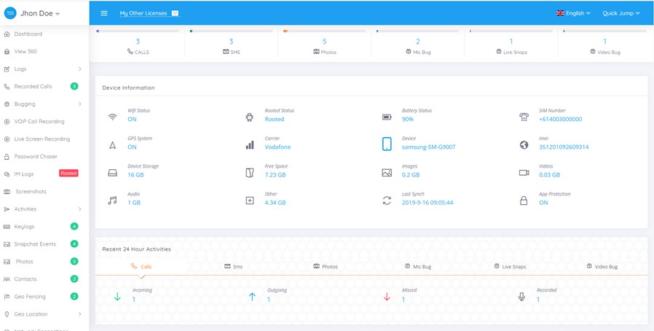
Users can manage and monitor all parameters via an informative dashboard accessible from any browser.
Pros:
Regarded as one of the most powerful hidden spy apps for Android and iOS.
Provides full access to all phone features, including the ability to listen to live calls and record them.
Offers a surround listening feature for additional monitoring.
Great user experience and ease of use, with a phone option that comes pre-installed with the spy app.
Free installation service for users who are not tech-savvy.
Cons:
To run on iOS devices, jailbreaking is required, which may not be suitable or feasible for all users.
Advanced features on Android require rooting the device, which might void the warranty and pose security risks.
FlexiSPY’s extensive capabilities and its suitability for tech-savvy users make it a compelling choice for comprehensive monitoring needs on both Android and iOS platforms. However, potential users should be aware of the technical requirements, such as jailbreaking for iOS and rooting for Android, which could be significant drawbacks depending on individual circumstances and technical comfort levels.
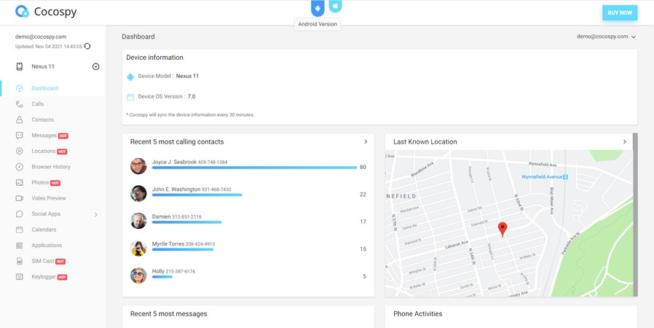
Cocospy is a popular spy app for both iPhone and Android devices, and it offers a range of features that make it appealing for various monitoring purposes. Below is an overview of why it’s considered a good choice in its category:
Features
Comprehensive Tracking: Cocospy allows you to track calls, text messages, location, social media activity, website history, and messaging apps. This comprehensive range of tracking capabilities can be invaluable for parents monitoring their children’s phone usage or for employers keeping tabs on company-issued devices.
Geofence Alert: This feature notifies you when the target device enters or leaves a predefined geographical area, which can be useful for ensuring the safety of loved ones or tracking the movement of employees.
Stealth Mode: The app operates in a stealth mode, meaning it remains hidden on the target device, ensuring that the person being monitored is unaware of its presence.
Pros
Secret Monitoring: Cocospy can monitor devices secretly, ensuring that the user of the target device remains unaware of the surveillance.
No Root or Jailbreak Needed: Unlike many other spy apps, Cocospy doesn’t require you to root Android devices or jailbreak iOS devices, simplifying the installation process and reducing the risk of damaging the device or voiding its warranty.
iOS No-Install Feature: For iOS devices, there’s no need to install any software on the target device, which further simplifies the process and reduces detection risk.
24/7 Customer Support: Continuous customer support ensures that any issues or queries can be resolved promptly.
60-Day Money-Back Guarantee: This offers a level of security for your investment, allowing you to test the service with less financial risk.
Cons
Limited Features Compared to Some Competitors: While Cocospy offers a range of tracking features, it may have a more limited set compared to the top apps in the category.
Pricing
Android Pricing: Ranges from $39.99 for 1 month to $199.99 for 12 months, depending on the plan.
iOS Pricing: Ranges from $49.99 for 1 month to $999.99 for 12 months, with plans for individual, family, and business use.
Compatibility
Android: Compatible with Android 4 and newer versions.
iOS: Compatible with all iOS devices.
Ethical and Legal Considerations
It’s crucial to consider the ethical and legal implications of using spy apps like Cocospy. In many jurisdictions, it’s illegal to monitor someone’s phone without their consent, especially for adults. It’s generally considered more acceptable for parents to monitor their minor children’s phone usage for safety reasons. Always ensure that you’re complying with local laws and respecting privacy rights when using such applications.
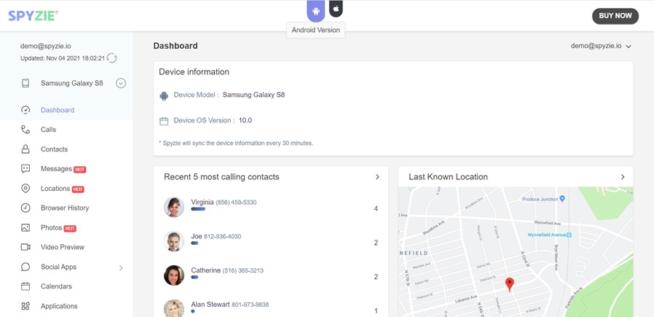
Spyzie stands out as a spy app for both iPhone and Android devices for several reasons:
Wide Compatibility: Spyzie is compatible with Android 4.0 and newer, as well as all versions of iOS. This broad compatibility ensures that it can be used on a wide range of devices.
Real-Time Monitoring: The app updates data in real-time, allowing for up-to-the-minute tracking and monitoring of the target device. This is crucial for users needing current information.
Comprehensive Tracking Features: Spyzie offers an extensive range of tracking capabilities, including call recording, screen capture, keylogger, surround sound recording, and more. It also covers traditional spy app features like tracking location, contacts, call logs, text messages, and social media activities.
User-Friendly Interface: The app is designed for ease of use, which is beneficial for users who may not be technically inclined. Plus, there’s customer support available for assistance with setup and configuration.
Online Control Panel: The online dashboard provides convenient access to all the app’s features, allowing for easy monitoring and control.
No Need for Root or Jailbreak: For iOS devices, there’s no need to install the app; users can simply provide iCloud credentials of the target device. This feature simplifies the process and avoids the need for jailbreaking, which can be a complex and risky process.
Invisible Mode and Hidden App Functionality: Spyzie operates in an invisible mode, ensuring that the target device’s user is unaware of its presence.
Additional Functionalities: Features like geofence alerts, access to multimedia files, and the ability to block inappropriate apps add to its versatility.
Customer Support and Money-Back Guarantee: These aspects enhance the reliability and trustworthiness of the service.
Flexible Pricing Plans: With different plans for Android and iOS, including options for individual, family, and business use, Spyzie caters to a range of budgets and needs.
However, it’s important to note the con:
Limited Advanced Features: Compared to some other spy apps, Spyzie may not offer all the advanced features. This could be a drawback for users needing more sophisticated monitoring tools.
Overall, Spyzie’s combination of user-friendliness, extensive features, compatibility with both Android and iOS, and various pricing options make it a strong choice for individuals seeking a reliable spy app solution.
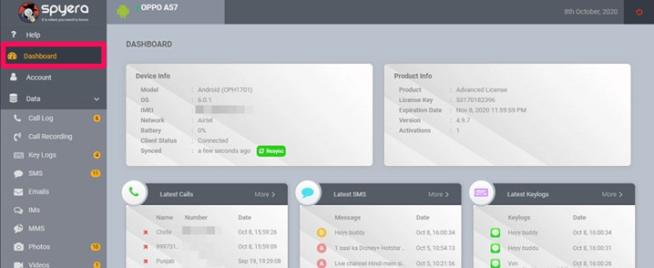
Spyera stands out as a spy app for iPhone and Android for several reasons:
Pricing: Spyera offers various pricing plans tailored to different devices, including smartphones, tablets, and computers. This flexibility allows users to choose a plan that best suits their monitoring needs and budget. The annual plans provide a cost-effective option for long-term use.
Compatibility: Covering Android up to version 11 and iOS up to version 14.X, Spyera supports a wide range of devices. This broad compatibility is crucial for users who need to monitor devices with different operating systems.
Ease of Use: One of the significant advantages of Spyera is that it does not require a complicated rooting procedure for Android devices, making it more accessible to users who are not tech-savvy or do not wish to risk voiding the device’s warranty.
Comprehensive Monitoring Features: Spyera offers a range of features that are essential for effective monitoring:
Text message monitoring and a keylogger to track what is being typed.
Social media and app tracking to monitor activities on various platforms.
Call recording, including calls made through messaging apps, which is particularly useful for comprehensive monitoring.
Advanced Surveillance Capabilities: Unique features like the ability to listen to and record the phone’s surroundings offer an extra layer of surveillance, allowing users to understand the context in which the device is being used.
Remote Control Features: The ability to remotely enable or disable Wi-Fi or internet connectivity is a powerful tool, especially for parents monitoring their children’s online activities or employers managing company-owned devices.
Anti-Theft Functionality: Features like SIM change notifications and GPS tracking enhance the app’s utility as an anti-theft solution, providing additional security for the device.
Stealth Operation: Spyera operates hidden and with full anonymity, ensuring that the monitored person is unaware of its presence, which is a critical aspect of any spy app.
Despite these advantages, there are cons to consider:
Requirement for Jailbreak on iOS: This requirement could be a significant drawback for iPhone users, as jailbreaking can void the warranty and expose the device to security risks.
Rooting Requirement for Some Android Features: Although most features are available without rooting, some advanced features may still require it, which might not be feasible or desirable for all users.
In summary, Spyera’s comprehensive features, including advanced surveillance capabilities, ease of use without the need for complex rooting or jailbreaking (in most cases), and its effectiveness as an anti-theft solution, make it a compelling choice for those in need of a spy app for iPhone and Android. However, the need for jailbreaking on iOS and rooting for some Android features should be carefully considered.
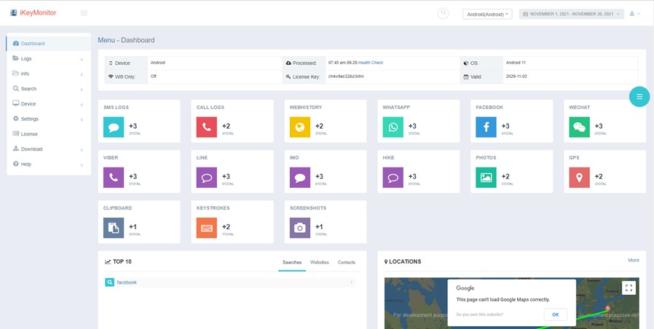
iKeyMonitor presents several advantages as a spy app for both iPhone and Android devices, making it an appealing choice for various monitoring needs:
Diverse Pricing Options: iKeyMonitor offers a free version with basic features, which is beneficial for users who need minimal monitoring capabilities. For more advanced features, there are paid add-ons starting at $16.66 per month for the family plan. The business plan is also cost-effective, especially for larger deployments, priced at $9.9 per month per device (with a minimum of 20 devices).
Wide Compatibility: The app supports a broad range of operating systems, including Android 3 and newer, as well as iOS 9.x to 14.x. It provides options for both jailbroken and non-jailbroken iOS devices, making it versatile for different user preferences and needs.
Comprehensive Monitoring Features: iKeyMonitor includes a variety of spying features such as tracking text messages and messaging apps, call recording and history logs, GPS tracking with geo-fencing, screenshot capability, checking installed apps and blocking inappropriate ones, clipboard access, viewing media files, and full remote control.
Invisible Mode: This feature ensures that the app operates in stealth, making it undetectable on the target device. This is crucial for covert monitoring.
Robust Parental Controls: The app provides features like screen time limits, making it useful for parents who want to manage their children’s device usage.
Powerful Keylogger Functionality: This allows for monitoring of chat applications, which is particularly useful for tracking communication on the target device.
However, there are some drawbacks:
Requirement for Jailbreaking/Rooting for Full Features: To access all the features of iKeyMonitor, the target device needs to be jailbroken or rooted. This process can be complex and might void the warranty of the device. It also exposes the device to potential security risks.
Complex Installation Process: The installation and setup process is more technical compared to some other spy apps, which might be challenging for users without technical expertise.
In summary, iKeyMonitor offers a range of robust spying features suitable for both personal and business use, with a flexible pricing model and wide compatibility. However, the requirement for jailbreaking or rooting for full functionality and the complex installation process are significant considerations for potential users.
TheOneSpy is considered a good spy app for iPhone and Android due to several features and benefits:
Compatibility: TheOneSpy is compatible with a wide range of operating system versions, specifically Android 5-11 and iOS 11-14.1. This broad compatibility ensures that it can be used on a variety of devices.
Comprehensive Monitoring Features: The app offers a vast array of monitoring capabilities. These include control over the device’s microphone, front and rear cameras, the ability to record audio and video, take screenshots, and perform live screen recordings. Such features provide in-depth insight into the target device’s activities.
Social Media and App Tracking: The ability to track social networking and messaging apps, browsers, YouTube, application passwords, SMS, emails, and other activities means that users can get a complete picture of the target’s digital interactions.
Call and Location Tracking: Features like call log monitoring, real-time call recording, GPS location tracking, and geo-fencing add to its utility as a comprehensive tracking tool.
Data Backup: The app offers a data backup feature for all lost or stolen data, which is crucial in scenarios where data preservation is important.
User-Friendly Interface: Its intuitive menu and ease of installation make it accessible even for those who are not technically savvy.
Discreet Operation: With a hidden app icon and secret mode, the app operates discreetly, which is a key feature for spy apps.
Affordable Pricing: The app has relatively affordable pricing options for both Android and iOS, making it accessible to a wider range of users.
Customer Support: Offering 24/7 customer support enhances user experience and provides assistance when needed.
However, there are some significant cons to consider:
Requirement for Jailbreaking and Rooting: For iOS, the app requires a jailbreak, and many of its Android features are only available on rooted devices. This can be a major drawback as jailbreaking or rooting devices can void warranties and expose them to security risks.
Limited Compatibility with Older iPhones: The app does not work on older iPhone models, which limits its applicability for users with such devices.
In summary, TheOneSpy’s wide range of features, compatibility with recent operating systems, user-friendly interface, and affordable pricing make it an appealing choice for those in need of a spy app for iPhone and Android. However, the need for jailbreaking or rooting and limited compatibility with older iPhones are significant drawbacks that potential users must consider.
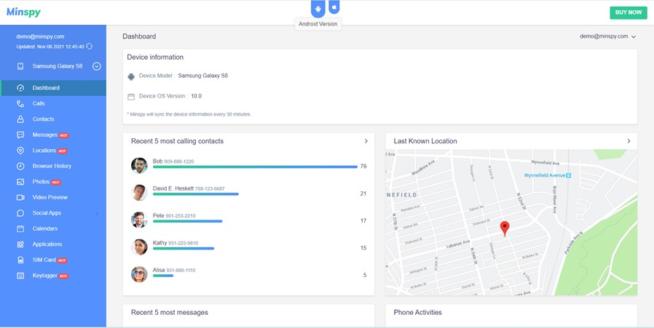
Minspy offers several features and benefits that make it a notable choice for a spy app on both Android and iOS devices. Here’s a breakdown of its key attributes:
Pricing Options: Minspy provides a variety of pricing plans for different needs, including basic, premium, family, and business plans. This flexibility allows users to choose a plan that best suits their requirements and budget.
Compatibility: Supporting Android 4 and newer, as well as all iOS devices, Minspy covers a broad range of the most commonly used smartphones and tablets, making it accessible to a wide audience.
No Jailbreak or Root Required: One of the significant advantages of Minspy is that it doesn’t require jailbreaking or rooting the target device to access all of its features. This is crucial as jailbreaking or rooting can void the warranty of the device and make it vulnerable to security risks.
Stealth Mode: After its installation, Minspy operates in an invisible mode by hiding its icon and not showing up in the process manager. This feature ensures that the app’s presence remains undetected on the target device.
Low Resource Consumption: It’s designed to consume minimal device resources and battery, which is essential for maintaining the regular performance of the target device and not arousing suspicion.
User-Friendly Setup: The setup process is relatively straightforward and quick, enhancing its appeal to users who might not be very technically skilled.
Comprehensive Monitoring Features:
Call and Text Monitoring: Tracks incoming and outgoing calls and text messages, including details like timestamps, duration, and contact information.
GPS and Geofence Alerts: Offers location tracking and alerts when the device enters or leaves specified areas.
Messaging Apps and Browser Tracking: Monitors activity on various messaging apps and web browsers.
Keylogger and Call Records: These features provide detailed insights into the user’s interactions on the device.
Remote Tracking for iOS: For iOS devices, there’s no need to install the app; you can simply use iCloud credentials for monitoring.
Customer Support and Money-Back Guarantee: Round-the-clock customer support and a money-back guarantee add to the user’s confidence and satisfaction.
Invisible Mode: This mode ensures that the app remains hidden from the device user.
However, there are also some limitations:
Limited Feature Set: Compared to some top-tier spy apps, Minspy’s range of features may seem somewhat restricted, which could be a drawback for users looking for more advanced functionalities.
In summary, Minspy’s ease of use, compatibility with both Android and iOS, and a range of essential monitoring features make it a good choice, especially for those who need straightforward, reliable tracking without the need for advanced spying functionalities. As always, it’s important to use such apps ethically and legally, adhering to privacy laws and regulations.
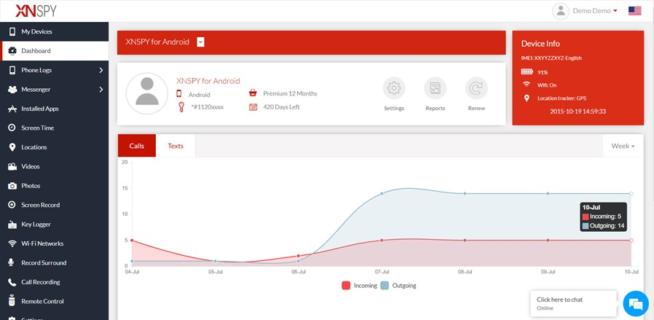
XNSPY stands as a noteworthy spy app for both iPhone and Android devices, offering a blend of standard and advanced monitoring features. Below are the key aspects that highlight its strengths:
Pricing Structure:
Basic: $29.99 for 1 month, $41.99 for 3 months, $59.99 for a year.
Premium: $35.99 for 1 month, $59.99 for 3 months, $89.99 for a year.
Compatibility:
Supports Android versions 4-11 and iOS 6.x-15.0.1.
Versatile Monitoring Capabilities:
XNSPY is designed for parents and employers to monitor cell phone activities comprehensively.
It allows users to read text messages, track current phone locations, and monitor phone activities discreetly.
Social Media and Online Activity Monitoring:
The app offers extensive social media monitoring capabilities, covering platforms like WhatsApp, Instagram, Snapchat, Facebook Messenger, and Twitter.
Users can access photos and videos on the target device, as well as track GPS locations.
Real-Time Dashboard:
All data is uploaded to a real-time dashboard, facilitating easy monitoring of multiple devices simultaneously.
Users can seamlessly switch between devices for efficient tracking.
Robust Feature Set:
Includes a messaging app screen recorder.
Provides real-time tracking of phone calls and messages.
Tracks messaging apps, including sent and received media files.
Features GPS location tracking with specific location alerts.
Offers emails and online activity tracking.
Capable of recording phone calls and surrounding sounds.
Provides full remote control over the target device.
Pros:
Real-time dashboard that displays detailed information about application activities.
Reliable GPS location tracking feature.
Hidden keylogger function for recording keystrokes.
Ability to track multiple devices conveniently.
Affordable pricing, making it accessible to a wider audience.
Cons:
Advanced spying features require jailbreaking for iOS and rooting for Android, which can be complex and risky.
Customer support is reported to be slow in responding to queries.
XNSPY’s diverse feature set, especially its social media and location tracking capabilities, make it an attractive choice for those looking to monitor digital activities on iPhones and Android devices. The app’s real-time dashboard and ability to handle multiple devices add to its appeal. However, potential users should consider the technical requirements for accessing advanced features and be prepared for slower customer support responses.
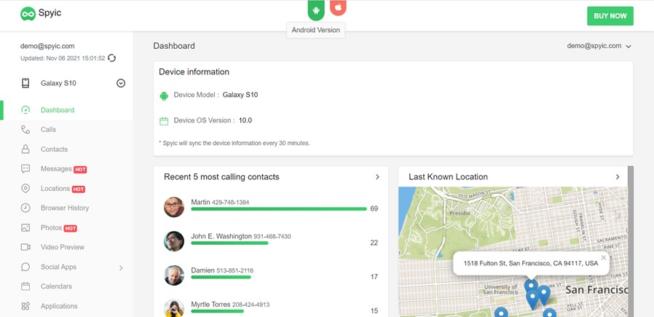
Spyic is a notable spy app available for both iPhone and Android devices, favored for its wide range of features and ease of use. Here’s an overview of why it is considered a good choice for monitoring purposes:
Features
Text Messages Tracking: Spyic allows users to view both received and sent SMS, complete with date and time stamps. It also provides sender and recipient contact information, which can be crucial for full context.
GPS Location Tracking: The app offers real-time GPS tracking and notifies users when the monitored device leaves a predefined safe zone, which is particularly useful for parental control.
Access to Contact List and Call Log: Users can view the target device’s contact list and call log, providing insights into the phone usage and interactions.
Monitoring of Messaging Apps: Spyic can track all popular messaging apps, which is essential as much of today’s communication happens through these platforms.
Web Browser History Tracking: The app monitors Internet searches and bookmarks, offering insights into the online behavior of the person being monitored.
SIM Activity Tracking: It keeps track of the SIM activity on the target device and alerts users if the SIM information is changed, adding an extra layer of security.
Pros
100% Invisibility: Spyic operates in stealth mode, making it completely invisible on the target device. This is crucial for discreet monitoring.
No Root or Jailbreak Needed: The app doesn’t require rooting Android devices or jailbreaking iOS devices, simplifying the installation process and maintaining device integrity.
Remote Installation on iOS Devices: For iOS devices, Spyic allows remote installation, which is a significant convenience.
Affordable Pricing: Spyic offers various pricing plans that are relatively affordable compared to other apps in the market, making it accessible to a broader audience.
Cons
Limited Advanced Features: While Spyic offers a comprehensive set of standard monitoring features, it may lack some of the more advanced features found in the top apps in its category.
Pricing
Android Pricing: Ranges from $39.99 for 1 month to $199.99 for 12 months, with different plans available.
iOS Pricing: Ranges from $49.99 for 1 month to $999.99 for 12 months, with options for individual, family, and business plans.
Compatibility
Android: Compatible with Android 4 and newer versions.
iOS: Compatible with all iOS devices.
Ethical and Legal Considerations
It’s important to remember that the use of spy apps like Spyic should be undertaken with careful consideration of ethical and legal implications. These types of apps should primarily be used for legitimate purposes such as parental control or employee monitoring with consent. Unauthorized monitoring can violate privacy laws and ethical norms, so it’s crucial to ensure compliance with local regulations and to use such tools responsibly.
All spy apps work in the same way. You have to install and activate the app on the target device. Usually, it takes minutes. Once the spy app is set up, it collects hidden and invisible personal data and sends it to a server. You can access the server through a web interface and check all kinds of information, depending on the app and tariff plan.
Typically, smartphone or tablet owners usually have no way of recognizing that an app is installed on their device. This is possible because the spy apps hide their icon.
2.2 What can spy apps track?
Spy apps can track a wide variety of data:
emails
SMS and messaging apps data
photos and videos
phone and messaging apps calls
GPS location data
cell phone camera
calendar events
web browser history, etc.
2.3 Can you install a spy app on any smartphone?
Generally, you can install a spy app on any smartphone. In most cases, you need physical access to your target device.
To use the basic features, you will not need root or jailbreak. However, you still need to root or jailbreak your device for some premium features.
Until recently, it was only possible to install spy apps on an iPhone or iPad with jailbreak. Meanwhile, there are iPhone spy apps that work without jailbreaking. Some services do not even require installing an application. To start working, it is enough to approve the iCloud login and password.
2.4 Why do you need a spy app?
There are many reasons to use a spy app. The top three are:
Parents who want to monitor their children
Employers who want to monitor their employees
Life partners who suspect their significant other of infidelity
A spy app can be very useful, for example, for tracking your children’s online behavior. It will help to protect them from danger. For employers, on the other hand, it can be useful to make sure that employees work during working hours or that they are not using their cell phones for personal use.
2.5 Are spy apps legal?
Before you install a spy app, you should know that it is only allowed with the prior consent of the target device owner. Thus, secretly spying on partners or employees is illegal in many countries. The only exception to this rule applies to parents who want to monitor their children in which case, the use of smartphone spy apps is legal without their knowledge.
3. Conclusion
It is very important to select the right app for your needs. While almost all the spy apps provide the same basic features, not all of them provide advanced ones.
All the applications in our review are reliable and safe. You can use them without any risk.
Marcus is a cybersecurity analyst with a focus on VPN and proxy services. As the founder and driving force behind a prominent VPN and proxy website, Private Proxy Guide, Marcus has emerged as a trusted authority in the digital realm. With a passion for staying ahead of evolving cyber threats, he has played a pivotal role in educating and empowering individuals and businesses to safeguard their online presence.
To provide the best experiences, we use technologies like cookies to store and/or access device information. Consenting to these technologies will allow us to process data such as browsing behavior or unique IDs on this site. Not consenting or withdrawing consent, may adversely affect certain features and functions.
Functional
Always active
The technical storage or access is strictly necessary for the legitimate purpose of enabling the use of a specific service explicitly requested by the subscriber or user, or for the sole purpose of carrying out the transmission of a communication over an electronic communications network.
Preferences
The technical storage or access is necessary for the legitimate purpose of storing preferences that are not requested by the subscriber or user.
Statistics
The technical storage or access that is used exclusively for statistical purposes.The technical storage or access that is used exclusively for anonymous statistical purposes. Without a subpoena, voluntary compliance on the part of your Internet Service Provider, or additional records from a third party, information stored or retrieved for this purpose alone cannot usually be used to identify you.
Marketing
The technical storage or access is required to create user profiles to send advertising, or to track the user on a website or across several websites for similar marketing purposes.